Download Betacular App for Android and iOS with Bonus Offers

The Betacular app gives you legal online sports betting and casino gaming for Indian users in one mobile application. You can bet on cricket, football, kabaddi, and play slots or live casino on the same account.

New users get a 100% welcome bonus on the first deposit up to 10,000 INR. Install the app, create an account, deposit, and the bonus is added as per the offer terms.

Start using the Betacular app today so you can bet, play, and withdraw directly from your phone.

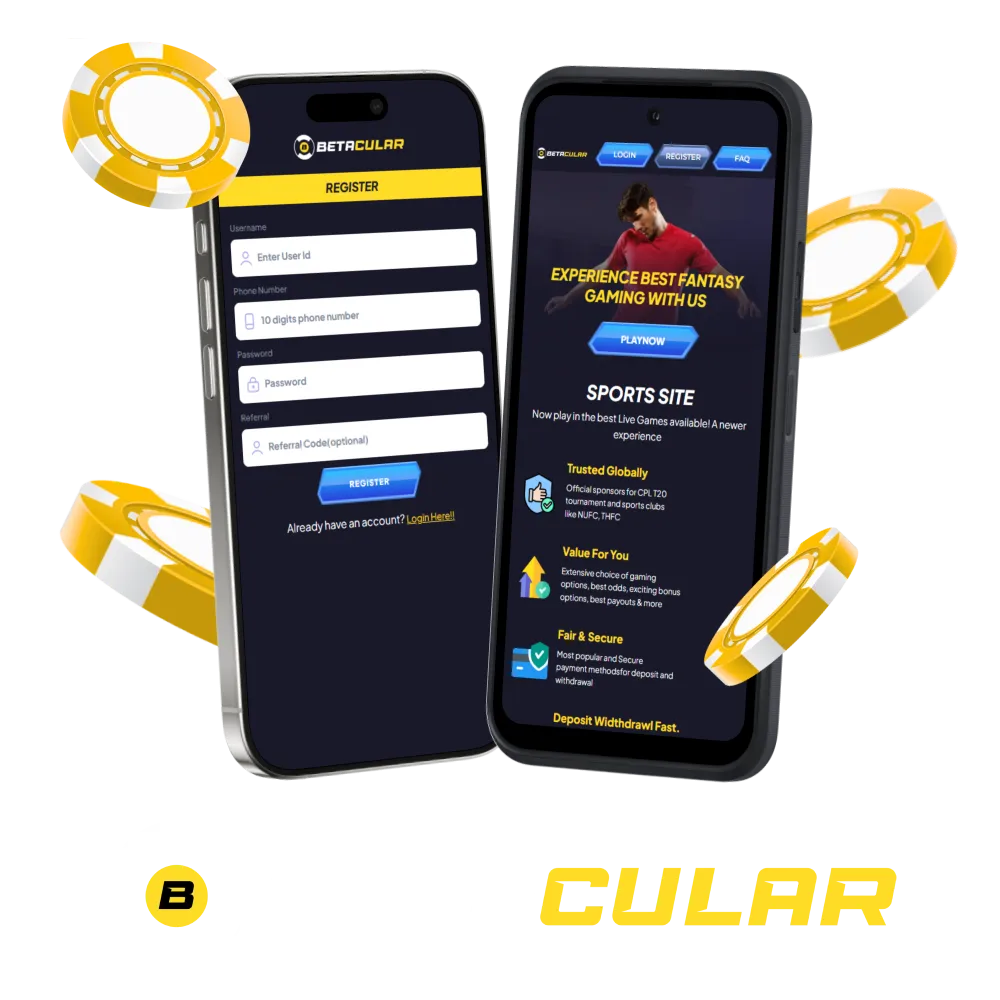
Betacular mobile app for Android and iOS shown on smartphone screens

Download Betacular APK for Android in 3 steps

You can complete Betacular APK download and installation in a few minutes. Follow this simple guide on your Android phone and start betting from the app.

1

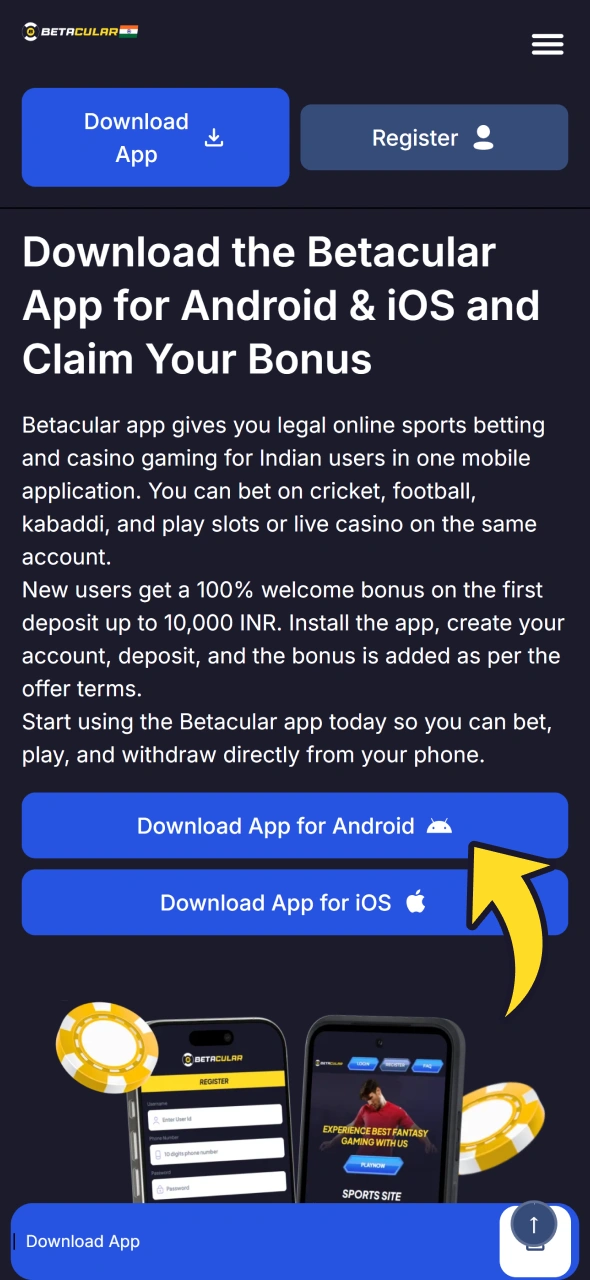
Tap the "Download App" Button

Open the official Betacular website in your Android browser and scroll to the download area. Tap the Android "Download App" button to reach the APK page.

Step 1 of the Betacular APK download: the Download App button for Android
2

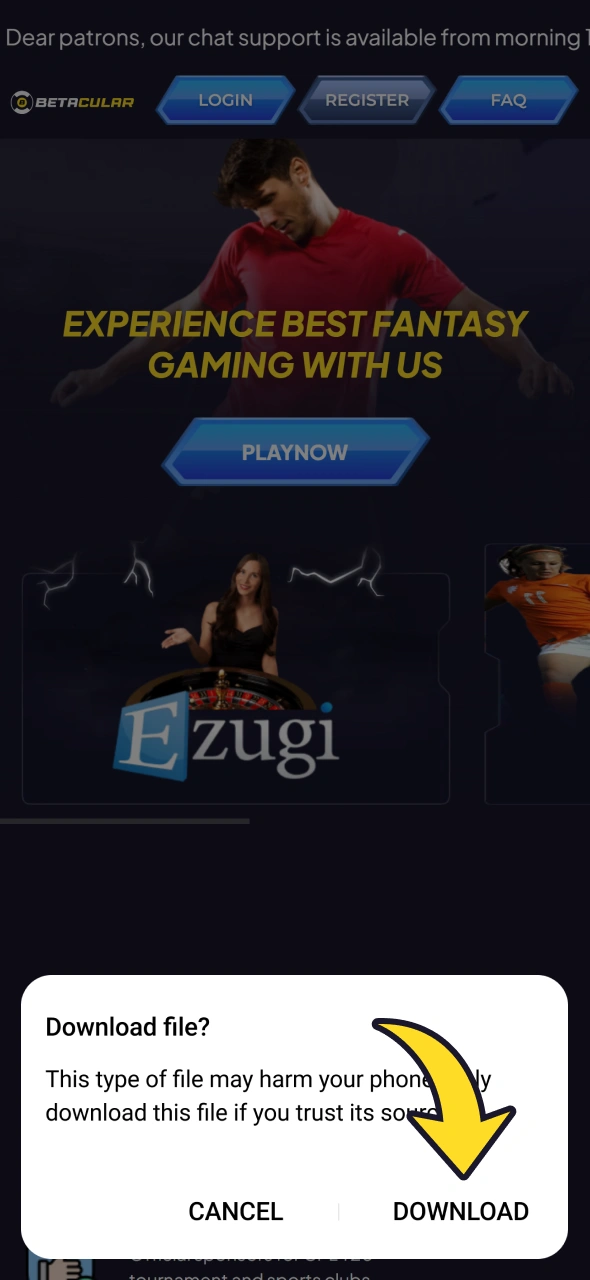
Download the Betacular APK

Confirm the Betacular download in your browser, then wait for the APK file to finish downloading on your phone.

Betacular APK file downloading from the official website in an Android browser
3

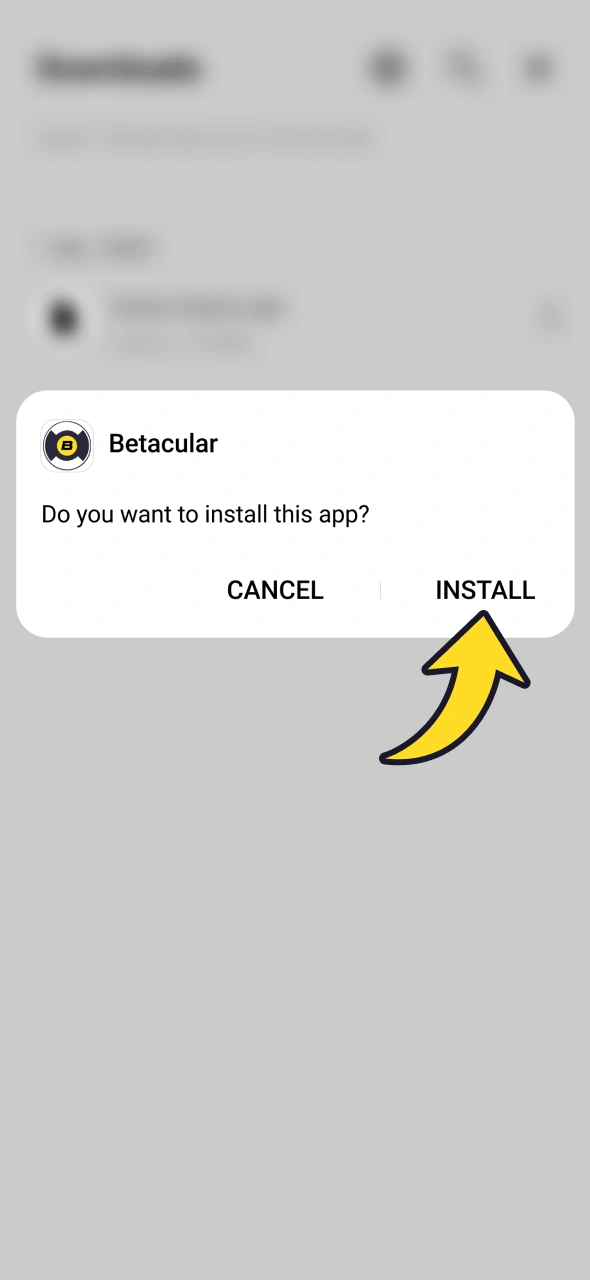
Install the App

Open the downloaded Betacular APK file, allow installs from this source, then tap Install to complete.

Installing the downloaded Betacular APK on an Android phone

System Requirements for Android

Most modern Android phones in India can run the Betacular application smoothly. You still need basic system resources to ensure fast odds updates and stable casino sessions.

Item Details
Operating System Android 6.0 or higher recommended
RAM At least 2 GB RAM for smooth betting and gaming
Storage Space Around 200 MB free for Betacular app and cache data

Meeting these system requirements helps you avoid crashes during betting or live casino play.

Supported Devices for Betacular APK Version

The Betacular app is optimised for Indian Android models from major brands. If your phone is not very old and runs Android 6.0 or higher, it should handle betting and casino games comfortably.

Here are the phone families that suit the Betacular APK download version.

Brand Model Families
Samsung Galaxy A, M, F and S series, Galaxy Z Flip and Z Fold
Xiaomi Redmi, Redmi Note and Xiaomi series
Poco Poco X, M and F series
Vivo V, Y and T series
Oppo Reno, F and A series
Realme Number series, Narzo and C series
OnePlus OnePlus, Nord and Nord CE series
Google Pixel series
Sony Xperia 1, 5 and 10 series
Huawei P and Nova series

If your device is similar in specs to these models, the Betacular application should run smoothly.

Download Betacular App for iOS (PWA) in 4 steps

iPhone users access the Betacular app using a PWA (progressive web app). You install it straight from Safari to your home screen, so it behaves like a normal iOS app.

1

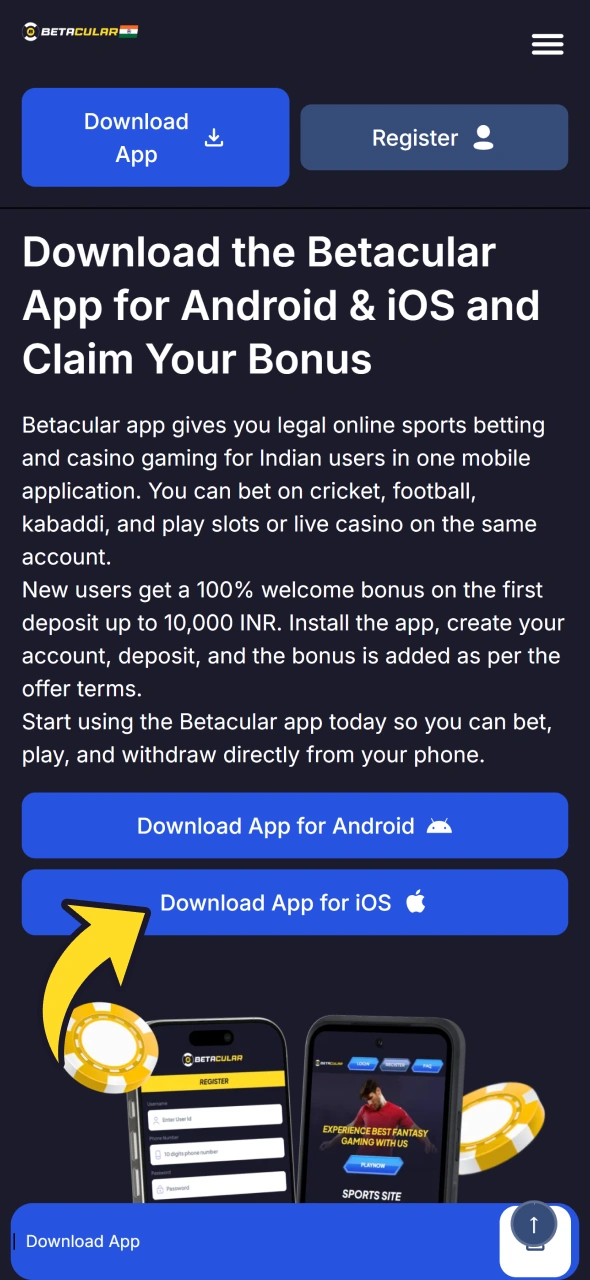
Tap Download App for iOS

Open the official website in Safari on your iPhone and tap the "Download App for iOS" button.

Download App for iOS button on the Betacular website opened in Safari
2

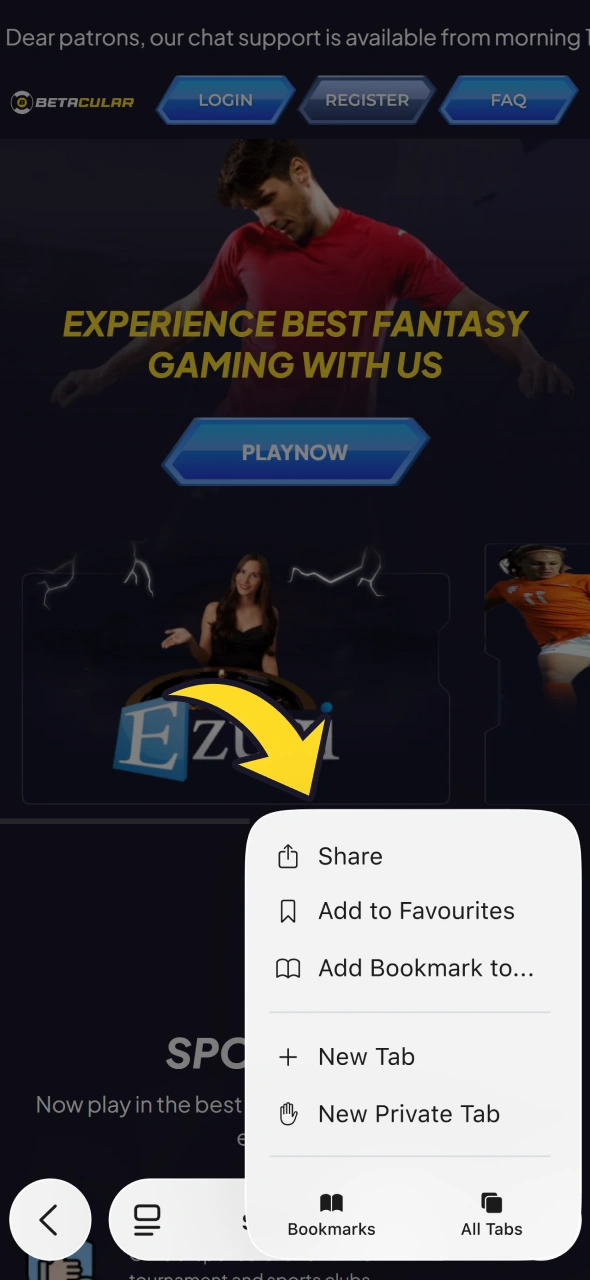
Tap Share

In Safari, tap the Share icon at the bottom of the screen to bring up iOS sharing options.

Share button in Safari on iPhone, used to add the Betacular PWA
3

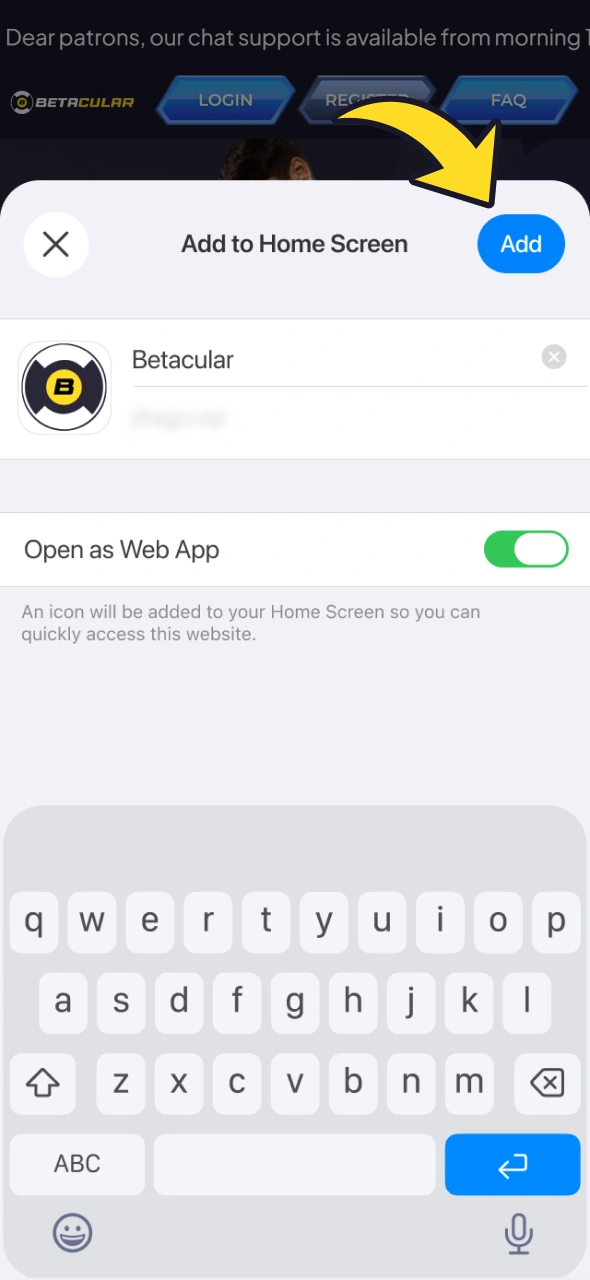
Select "Add to Home Screen"

Choose "Add to Home Screen", confirm the app name, then tap Add to place the icon on your iPhone.

Add to Home Screen option in Safari for the Betacular PWA on iPhone
4

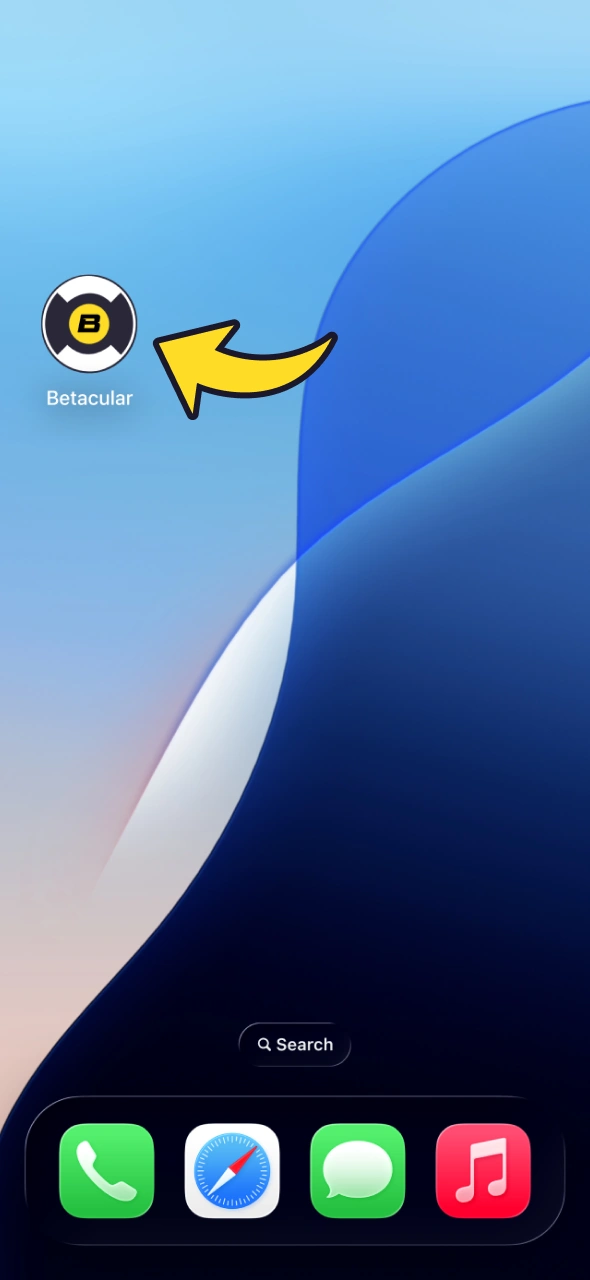
Begin Exploring

Tap the new home screen icon, log in to your account, and start betting or playing casino directly, just like a regular app on your iPhone.

Betacular PWA icon on the iPhone home screen, ready to open

Supported Devices for Betacular iOS Version

The Betacular app for iOS works through Safari, so any recent iPhone that supports a modern iOS version can handle it. You only need a stable internet connection and enough storage to keep Safari running smoothly.

Here are the iPhone models that run the Betacular PWA comfortably.

Brand Models
Apple iPhone 11 or newer on a recent iOS version, including mini, Plus, Pro and Pro Max models

If your iPhone runs the latest iOS or a recent version, the Betacular application in PWA form should perform well.

Registration Process via App

Creating a new account inside the Betacular app takes only a few minutes and is needed for real-money betting or casino play.

  1. Open the installed app or iOS PWA and tap on the “Register” or “Sign Up” button on the home screen.
  2. Enter basic details like full name, mobile number, email, date of birth, and set a strong password. Use accurate personal data to avoid issues later.
  3. Choose your account currency (INR for India users), confirm that you are 18 or older, and accept the terms and conditions after reading them.
  4. Submit the form and open the confirmation link or OTP you receive by email or SMS to activate the account.
  5. Log in, visit the cashier, make your first deposit, and claim the Betacular welcome bonus as per the promotion rules.

Following these registration steps helps you avoid verification problems later.

Bonuses for Mobile Players

Using the Betacular app on mobile gives you access to the same welcome package and promos seen on the desktop site. You can claim bonuses for sports or casino play, funding your deposits with UPI, Paytm UPI, net banking or crypto.

Some offers are time-limited or event-based, such as cricket series boosts or slot tournaments. Always read each promo page carefully before you bet.

Depending on current promotions, app users may also get reload bonuses, free bets or free spins; the Promotions page on the site lists the offers that are live.

Welcome Bonus

First deposit match bonus for new users.

First deposit casino bonus icon for the 100% welcome offer at Betacular

Amount: 100% bonus up to 10,000 INR on your first qualifying deposit.

Terms and Conditions: Minimum deposit applies, wagering requirements on bonus funds, contribution rules for different games, and bet limits for qualifying turnover.

Validity Period: Bonus usually must be claimed and wagered within a fixed number of days after activation.

Eligible Games: The sports markets and casino games listed in the bonus terms on the site.

Deposit Bonus

Reload or percentage top-up on later deposits when specific promos run.

Weekly sports reload bonus icon at Betacular

Amount: A percentage top-up on a later deposit, capped at a set INR amount; the current rate is shown in each promotion.

Terms and Conditions: Promo code may be required, wagering rules apply, and only certain bet types count towards turnover.

Validity Period: Available on specific days or campaigns, and must be wagered before expiry.

Eligible Games: Defined by each offer, commonly pre-match sports, live bets, or selected slot providers such as Pragmatic Play.

Free Bet

Free bet credits for sports, usually tied to qualifying wagers or events.

Free bet on cricket bonus icon at Betacular

Amount: A fixed free bet value set by each promotion, credited separately from your cash balance.

Terms and Conditions: Stake may not be returned on winning bets, minimum odds restrictions apply, and expiry dates are strict.

Validity Period: Free bet must be used within the time window stated in the promotion.

Eligible Games: Sports markets like cricket, football, and kabaddi that meet the odds and market rules in the promo.

Understanding these bonus details helps you avoid losing benefits due to missed terms or expired offers.

How to Update Betacular App to the Latest Version?

Keeping the Betacular app on the latest version ensures the fastest betting flow and access to new features. On Android, you usually see a prompt inside the app when a fresh version is ready.

Tap the update notice, confirm the new Betacular APK download, and install it over the old version. Your login, balance, and settings stay the same.

If you installed from a direct download link, you can revisit the official site, grab the newest APK, and run the installer. iOS PWA users get updates automatically the next time they open the app.

Updates also fix bugs that can interrupt live bets and add security patches, while outdated versions may fail to process deposits or withdrawals. Regularly checking for updates keeps your app stable and compatible with new payment and security tools.

How to Place a Bet?

You can place a sports bet inside the Betacular app in a few simple steps.

1

Step 1

Log in to your account and check that your real-money balance is funded.

2

Step 2

Open the sports section, choose a game like IPL cricket, basketball or football, and tap the odds you want.

3

Step 3

Review the betslip, enter your stake amount in INR, and check potential returns displayed.

4

Step 4

Confirm the bet by tapping the place bet button and wait for the bet acceptance message.

How to Delete Betacular App?

You may choose to remove the Betacular application from your device at any time. On Android, go to Settings, open Apps, select Betacular, and tap Uninstall, or long-press the app icon and choose Uninstall.

On iPhone, long-press the PWA icon on your home screen, tap Remove App or Delete Bookmark, and confirm the action. Removing the app does not close an account or withdraw funds, so log in through your browser if you need to cash out.

How to Login via Betacular App?

Logging into the Betacular app safely ensures you reach your bets, bonuses, and wallet in seconds.

1

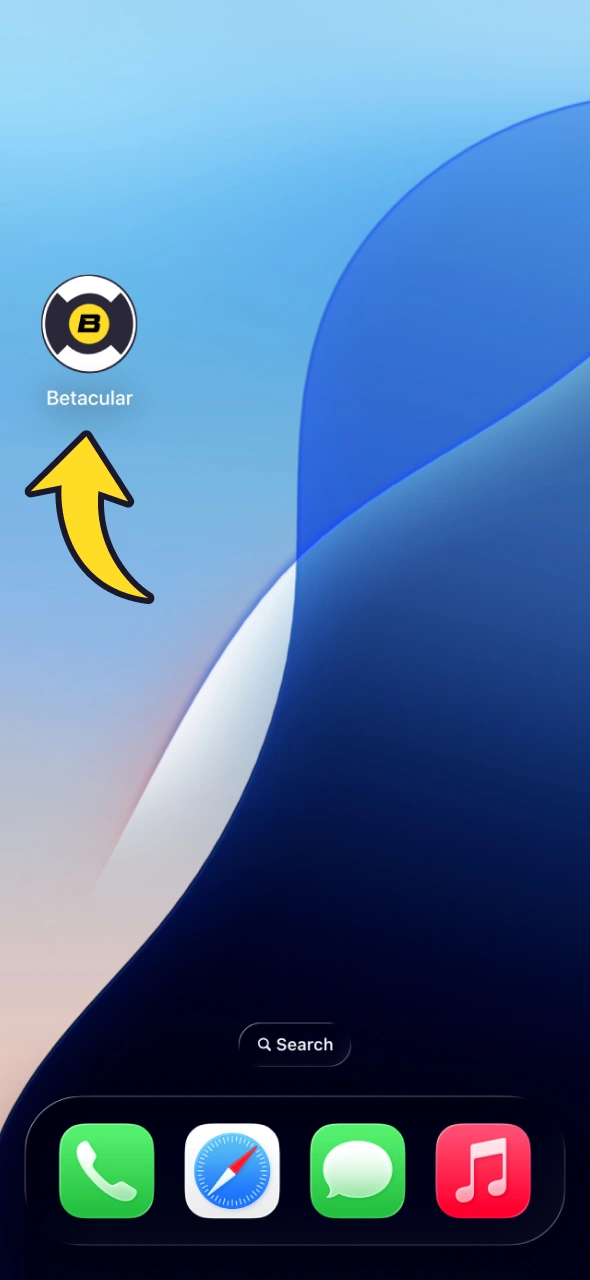
Open the App

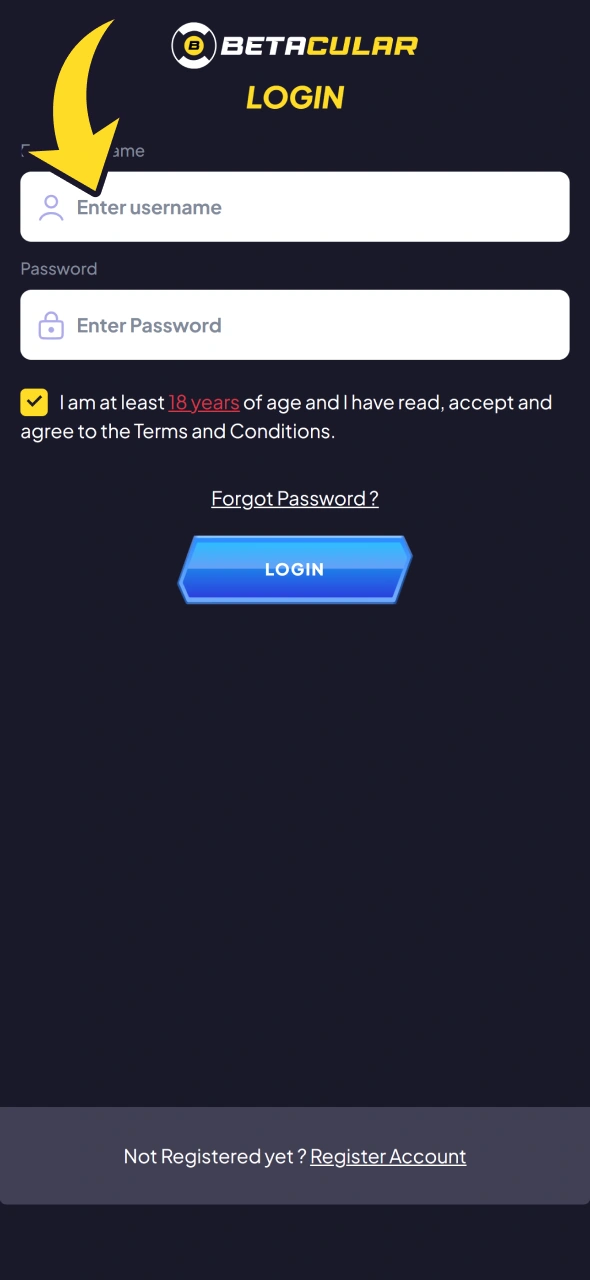
Tap on the app icon on your Android home screen or the PWA icon on iOS to reach the login page.

Opening the installed Betacular app on a smartphone to reach the login page
2

Type in Your Details

Enter the registered email or mobile number and your chosen password carefully, watching for capital letters or special symbols. If two-step verification or OTP is enabled, check SMS or email and type the code in the given field.

Betacular app login form with fields for email or mobile number and password
3

Confirm Your Sign-In

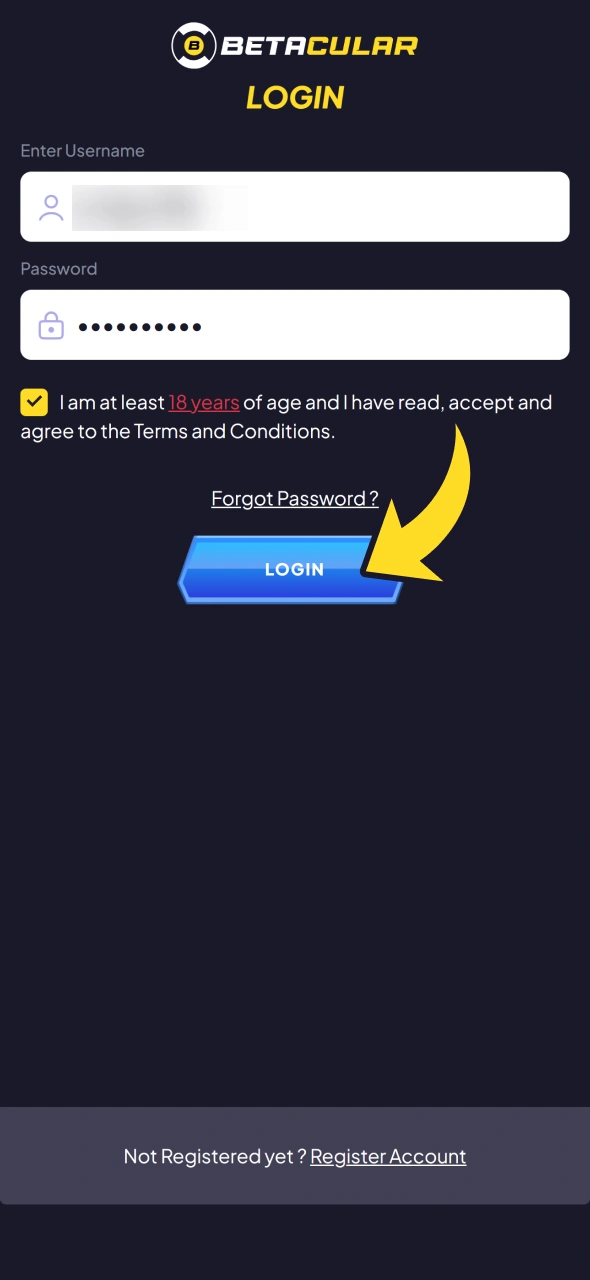
Tap the Login button and wait for the main lobby to load, then check your balance and any bonus notifications.

Login button in the Betacular app that confirms sign-in to the account
4

Optional: Reset Your Password

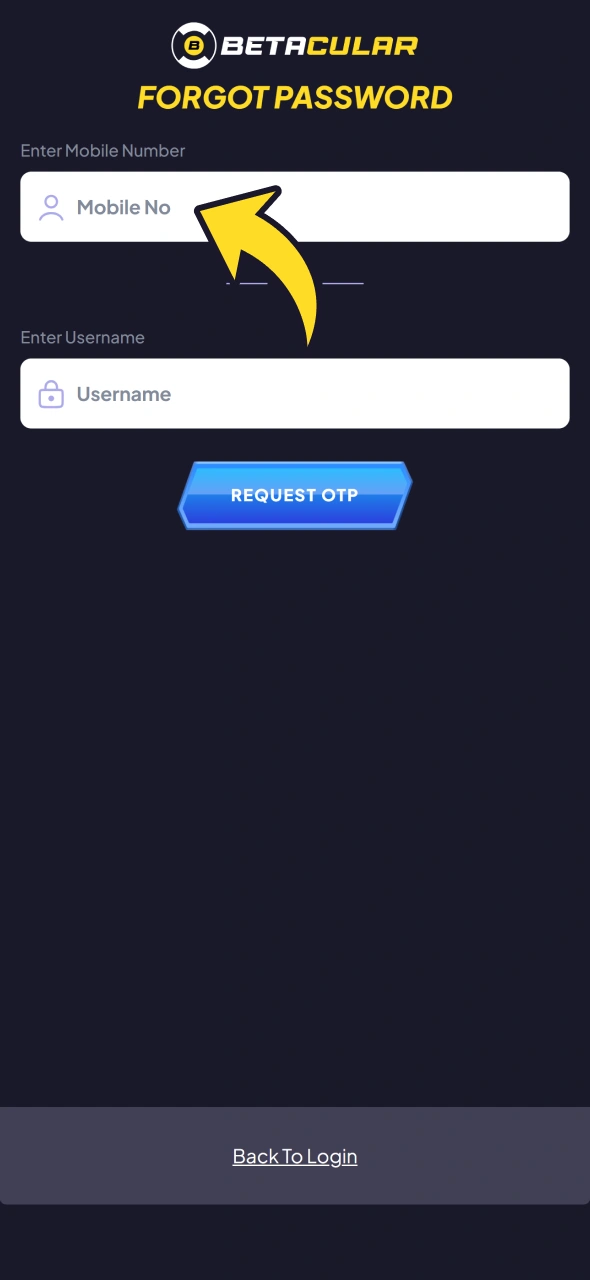
If you forget your password, use the "Forgot Password" link, follow the reset steps, and then log in again using the updated details.

Forgot Password option in the Betacular app for resetting the password

Betacular App Features

The Betacular app is built for Indian betting habits, focusing on cricket, quick UPI payments, and easy navigation between sports and casino. You can move from pre-match bets to live markets and then to slots or Aviator in a few taps.

The app keeps odds, live scores, and your betslip close together so decisions are faster. Casino users get modern slots plus live dealer tables hosted by real croupiers.

Payment screens support popular India options, keeping deposits and withdrawals straightforward. Account tools let you control limits, check history, and manage personal information.

Notifications highlight important events like bonus credits, match start times, and bet results. Overall, the Betacular app is designed to reduce friction from install to cash out.

Live betting section of the Betacular app with in-play odds

Live Betting Features

Live betting in the Betacular application focuses on cricket, football, tennis, and kabaddi. You see odds update quickly, letting you react to wickets, goals, or momentum swings.

Latency between live scores and odds changes is kept low so your bets stand a better chance of matching real game events. The interface shows the main lines, totals, and specials in a vertical list that fits mobile screens.

Key stats and scoreboards are visible on the same page, so you do not need separate tabs. Some events may offer live streaming or animated match trackers, giving extra context.

The betslip appears at the bottom of the screen, so you can adjust stakes even as odds move. Cash-out options appear where available, helping you manage risk mid-game.

Overall, live betting from the Betacular app helps you act fast on Indian and international matches.

Casino lobby in the Betacular app with slots, table games and live dealer rooms

Casino Games Features

The casino section in Betacular includes video slots, table games, and live dealer rooms. Popular providers such as Pragmatic Play, Evolution, and others supply titles.

Games like Book of Dead, Sweet Bonanza, and Lightning Roulette are commonly found, catering to both slot and table fans. Loading speed is tuned for Indian networks so even 4G connections handle most games smoothly.

Live casino streams use adaptive quality, adjusting video to match your internet strength. You can switch tables or game categories using a simple menu bar on top or bottom of the screen.

Favourites and recent games sections help you reopen commonly played titles faster. Demo or fun modes may be available on some slots, though real-money play needs a funded wallet.

This casino design lets you move from cricket bets to live blackjack or roulette in seconds.

User profile area in the Betacular app with personal details and account settings

User Profile Features

Your user profile area in the Betacular app gives full control over account data. You can view and edit basic personal details such as address, phone, and communication preferences.

Balance information appears clearly on the home screen and cashier pages. Transaction history lists deposits, withdrawals, and bet settlements, helping you track activity.

KYC document upload tools let you send ID photos straight from mobile camera. You can also review limits, self-exclusion options, and responsible gaming tools.

Password change and security settings sit inside the same profile zone. Setting these correctly keeps your account safer while betting or playing casino.

Notification settings in the Betacular app for bet results and match alerts

Notification Features

Notifications inside the Betacular app help you stay informed without sitting on the app all day. You can opt in for alerts on bet results, cash-out offers, and key match events.

Promotional messages highlight new bonuses, free bets, or tournaments relevant to your activity. Users can usually control which types of notifications they receive from the settings menu.

Push alerts on Android and iOS show on lock screen so you do not miss important updates. In-app messages appear as small banners or inbox items while you browse.

Delivery reliability depends on network quality but is tuned for Indian mobile conditions. Managing notification settings lets you stay updated without feeling flooded.

Deposit Features

Deposits in the Betacular app are built for Indian payment behaviour and low processing times. The cashier area groups methods into UPI, Paytm UPI, net banking and crypto, with cards where supported.

You can save frequently used options to fund your betting wallet quicker next time. Security layers protect card and bank details during each transaction.

Minimums are kept accessible for casual punters, while higher caps suit heavy bettors. Confirmation messages and balance updates arrive quickly so you know when funds are ready.

Customer support is available if you face failed or pending deposits. Overall, the deposit design focuses on fast, reliable crediting for Indian rupee accounts.

Item Details
Available Payment Methods UPI apps (PhonePe, Google Pay), Paytm UPI, NetBanking/IMPS, crypto, cards where supported
Deposit Minimum/Maximum From 500 INR, depending on the method; the limits for each method are shown in the cashier
Transaction Security Encrypted channels, secure payment processors, risk monitoring
Processing Time Usually instant; rare delays depend on bank or gateway

Understanding deposit options helps you choose the method that matches your bank and stake size.

Withdrawal Features

Withdrawals in the Betacular application go through UPI, Paytm UPI, bank transfer (IMPS/NEFT) or crypto for India users. Before your first withdrawal, complete KYC verification (PAN/Aadhaar or passport and address proof); the operator may ask for it earlier.

The withdrawal page shows your available balance, any bonus-related restrictions, and minimum limits. You can store bank details securely for future payouts.

Processing times vary by method and verification status, and most requests are completed within a few hours to a few business days. Status tracking lets you see if the request is pending, approved, or paid.

Support staff can help if a payout is delayed beyond the stated window. Proper personal details and completed KYC usually speed up approvals.

Item Details
Available Withdrawal Methods UPI, Paytm UPI, bank transfer (IMPS/NEFT), crypto
Withdrawal Minimum/Maximum From 1,000 INR, depending on the method; maximum limits are shown in the cashier
Transaction Security Encrypted banking data, manual checks for large payouts
Processing Time From a few hours to a few business days, depending on checks

Knowing these withdrawal rules helps you plan when to cash out and which method to use.

Betacular App Security Protocols

Security in the Betacular app focuses on protecting your personal data, bets, and payments. Data flowing between your device and the servers is encrypted using modern SSL or TLS standards.

Sensitive information such as passwords and payment details is stored in protected formats and handled by third-party payment processors. Login security includes strong password rules and session timeouts if the app stays idle.

OTP codes for key actions such as login or withdrawals, where enabled, help stop unauthorised access. Payment pages use secure gateways from established payment processors.

Internal risk tools monitor suspicious behaviour, such as multiple failed logins or unusual withdrawal patterns. These security measures together reduce the chance of fraud and keep the app safer for Indian users.

Betacular App Device Permissions

The Betacular application may request several permissions on your phone, each serving a specific purpose. Internet access is essential so the app can update odds, show live scores, and connect to payment gateways.

Storage permission lets the app save temporary files, images, and cache, which improves loading speed. Camera access might be used for KYC verification, allowing you to upload PAN or ID documents directly.

Notification permission enables push alerts about bet results, bonus offers, and account updates. Location access, if requested, helps check regional eligibility or language and currency preferences.

Phone status or device ID can assist in preventing fraud and managing account security on multiple devices. You can manage or adjust these permissions later in your Android or iOS settings.

Understanding each permission helps you stay comfortable while still getting full functionality from the Betacular app.

FAQ

Is the Betacular app legal in India?

Online betting in India sits in a grey area. Betacular operates using an offshore licence and accepts users from India, but you should only play where local laws do not prohibit online gambling and you are at least 18.

How fast can deposits and withdrawals be in the app?

UPI deposits usually credit within minutes once the bank approves, while net banking can take longer depending on your bank. Withdrawals take longer and depend on verification and bank processing, often from a few hours to a few working days.

Can you use one account on both mobile and desktop?

Yes, the same login works on Android, iOS PWA, and desktop browsers. Your balance, bets, and bonuses stay linked to one profile.

What happens if the app crashes during a live bet?

Your bet status is handled by the server, not your phone. When you reopen the app or log in through a browser, you can check open bets and settlement in the bet history section.

Can you set betting limits inside the app?

Yes, responsible gaming tools in the profile or settings area allow you to adjust deposit limits or apply cooling-off options as per the platform rules.

Updated: